
You can delete certifications that are no longer needed within your organization.
NOTE:
Deleting a certification from the system is different from removing a certification from a candidate profile.

When a certification is deleted from the system, the system no longer tracks it and candidates can no longer upload it.

If a certification has already been uploaded by a candidate, it must first be removed from the candidate profile before it can be deleted from the system.

Removing a certification from a candidate profile only removes it for that specific candidate. The certification will still exist in the system and can still be used for other candidates.
a. Access the Certifications section:
- Go to Documents from the left-hand menu
- Click Certificates
You will see a list of certifications organized by category.
b. Delete certification(s):
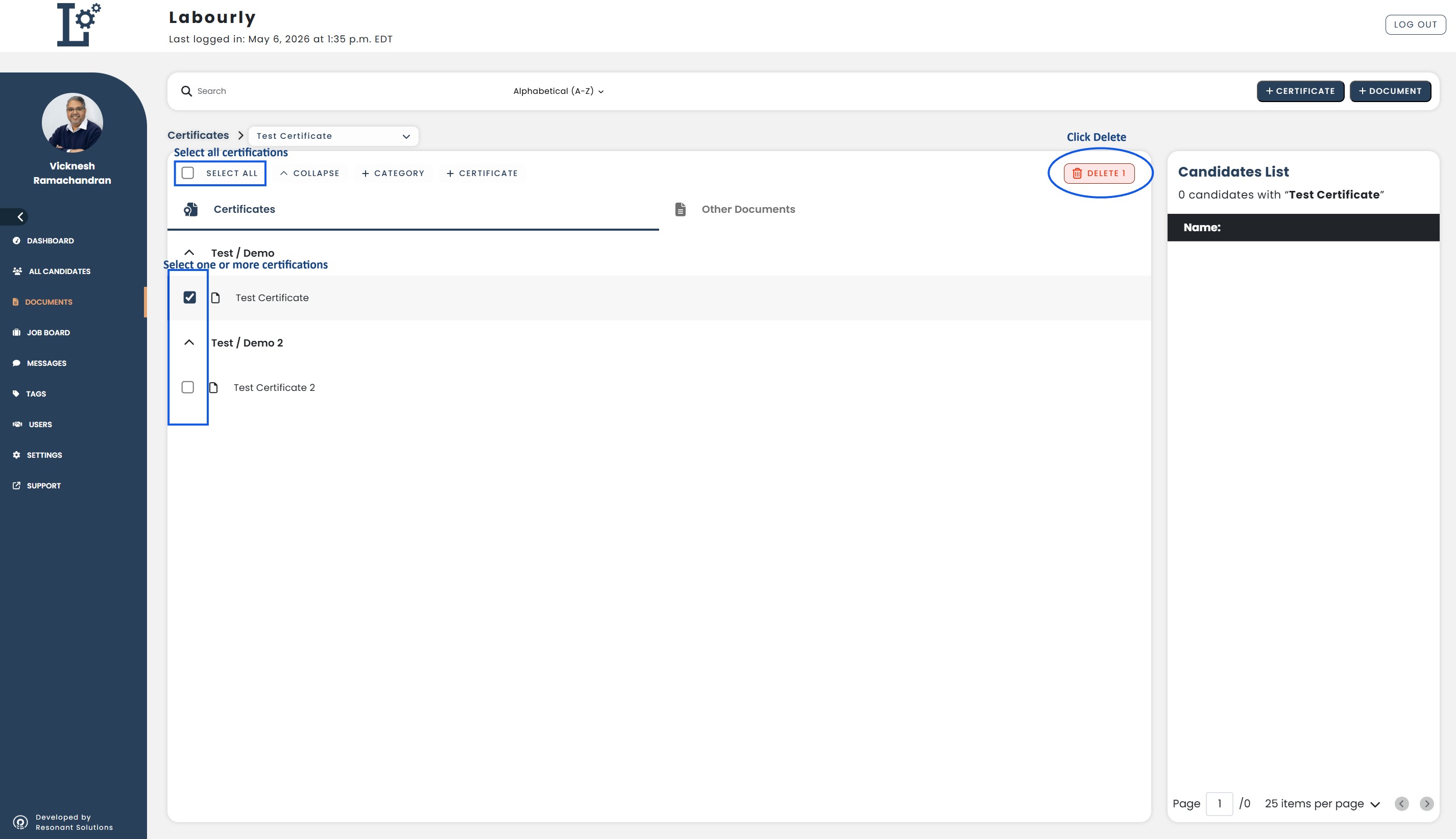
- Select the checkbox next to the certification(s) you want to delete
- You can select one or multiple certifications at the same time
- To delete all certifications in the list, click Select All at the top left
- Click Delete
c. Verify:
- Return to the Certificates section
- Confirm that the selected certification(s) no longer appear in the list
The selected certification(s) have been successfully deleted.See also: