
You can delete documents that are no longer needed within your organization.
NOTE:
Deleting a document from the system is different from removing a document from a candidate profile.

When a document is deleted from the system, the system no longer tracks it and candidates can no longer upload it.

If a document has already been uploaded by a candidate, it must first be removed from the candidate profile before it can be deleted from the system.

Removing a document from a candidate profile only removes it for that specific candidate. The document will still exist in the system and can still be used for other candidates.
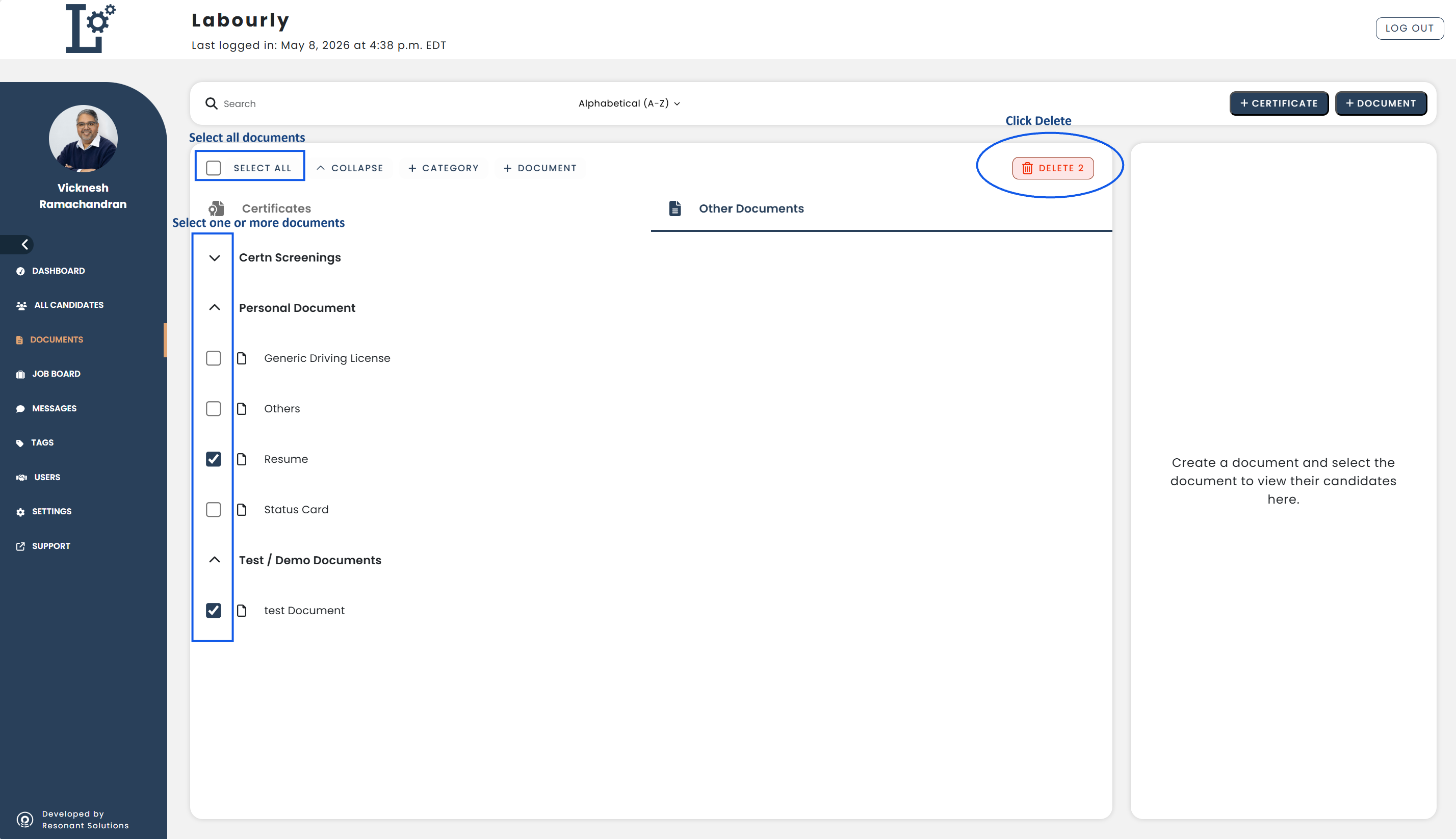
a. Access the Other Documents section:
- Go to Documents from the left-hand menu
- Click Other Documents
You will see a list of documents organized by category.
b. Delete document(s):
- Select the checkbox next to the document(s) you want to delete
- You can select one or multiple documents at the same time
- To delete all documents in the list, click Select All at the top left
- Click Delete
c. Verify:
- Return to the Other Documents section
- Confirm that the selected document(s) no longer appear in the list
The selected document(s) have been successfully deleted.See also: